I was a beta tester for Google’s Project Fi (later “Google Fi”) MVNO that provided cellular service over T-Mobile’s network. At the time, it was far cheaper than any other carrier and the first few years were fun: Google sent us presents and took good care of us. Later, it became mostly just another carrier and I was deeply into de-Googling my life. More important, when we moved to the island the only network option Google offered was T-Mobile, which has zero coverage anywhere near where we live even though their coverage maps show otherwise.
I eventually signed up with Consumer Cellular, which uses AT&T’s network. They seem to have very good customer service (generally) and we actually have (barely) usable AT&T cellular signal here.
I did notice one odd problem, though. Our neighbors are really into text messaging (I do a lot of texting, too, though I prefer Signal) and I noticed that often text messages I sent wouldn’t actually send. It was frustrating because I didn’t get any kind of notification. I wouldn’t see an error until the next time I went to send a test message, when I’d see a red “not sent; tap to retry” message. Often that was long after the message had any relevance. Or instead of a received message, I’d get a “message ready to be downloaded” button but downloading never worked.
Eventually, I figured out that what wasn’t working were MMS (multimedia message service) messages. While short text-only messages are sent via SMS (short message service), if a message is too long or if it had an attachment, then it gets sent via MMS. (Behind the scenes, it’s an SMS message that has a URL that points to the full message to download, though your messaging app hides that.) To make matters worse, if it’s a group text and the recipients are a mix of Apple iMessage and regular SMS users, then the message (even if it’s short and text-only) gets sent using MMS. So it took a while to figure out why all my testing worked but some messages from or to friends wouldn’t.
I called Consumer Cellular and they said that they don’t support GrapheneOS so I was probably out of luck. I asked if we could at least go through the proper configuration, and the agent agreed to do so but first she wanted to push an update to my phone. She did, and it promptly disconnected the call. When I called back, the next agent I got flatly refused to do anything to help unless I installed Google Messages. Have you read Google’s terms-of-service? No, thanks.
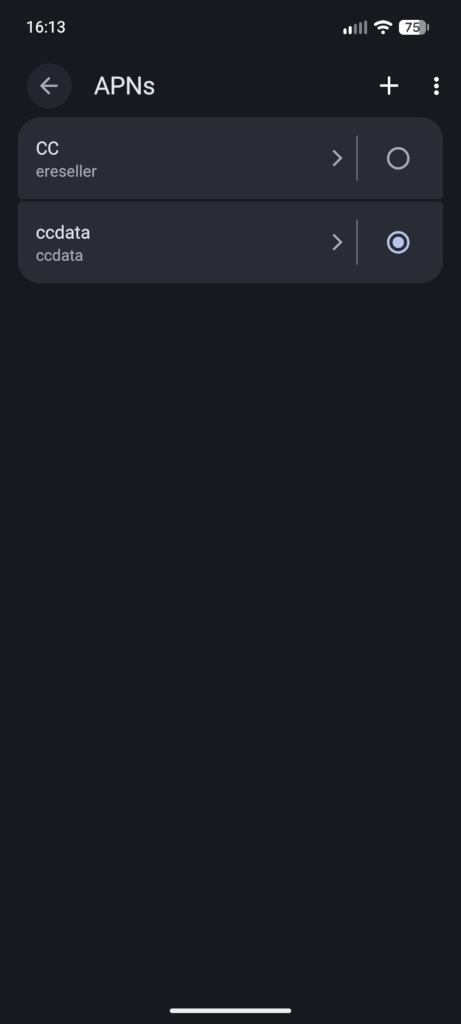
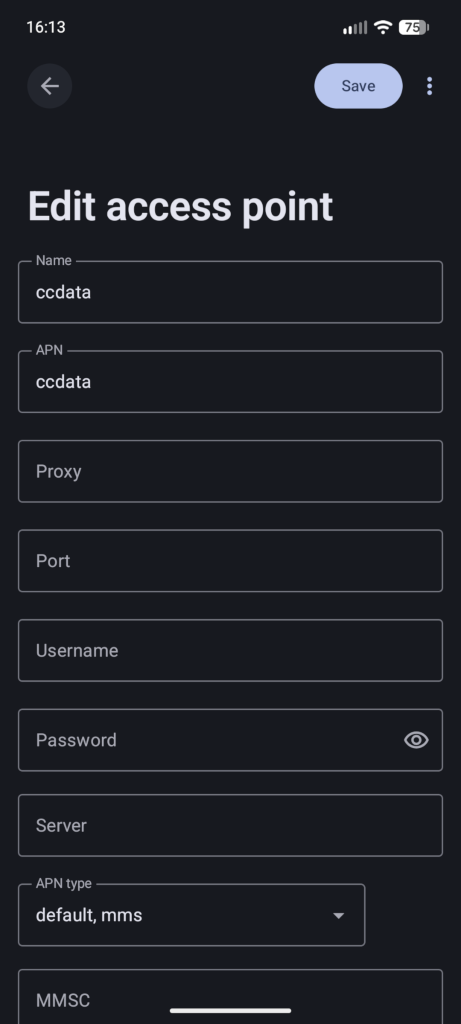
Then during my recent travels, I often needed to use mobile data and found that it would sometimes work and sometimes not, even when I had good signal strength. I was stuck in a motel room without much to do anyway, and did a deep dive and discovered that it was likely a problem with Access Point Names (APNs). I ended up going to settings
Settings > Network & internet > SIMs > _SIM name_ > Access Point Names
and creating a new access point called “ccdata” and populating it per the pictures above (basically, “ccdata” for the Name and APN fields, and “default, mms” for the APN type field.) That did the job.
If you’re using GrapheneOS with Consumer Cellular, I hope this helps. If you’re having MMS problems but using a different carrier, perhaps this will give you a hint as to where the problem lies.
—2p