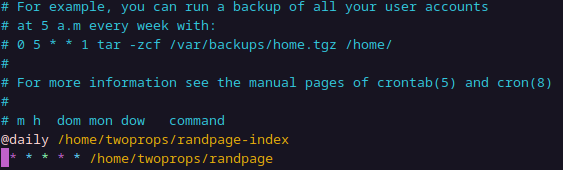
I should get back to more interesting topics after this, but there was a last bit of the random page function that I needed to finish.
As you might recall, I had decided to use a curious bit of code to run the page randomizer every two seconds:
nohup watch -n 2 /home/twoprops/randpage &>/dev/null &
Okay, it was an awful abuse of watch but it appealed to me. Unfortunately, none of usual tricks for getting it to run at boot time would work. I’m not sure what the problem is, but I suspect watch just doesn’t like being run headless. It was a cheap trick anyway, so I ended up abandoning it. Instead, I just run the randomizing code in a loop, thirty times, with a sleep 2 in the loop. So randomization happens every two seconds for one minute. Then I put in the crontab entry (above) to run the script every minute. While I was at it, I moved the wc -l function, which counts the lines in the links file, out of the loop so it will only happen once a minute instead of every two seconds. Here’s the latest (and final?) randpage script:
#!/bin/bash
set -euo pipefail
IFS=$'\n\t'

HTMLFILE="/var/www/twoprops/random"
LINKCOUNT=$(wc -l <randlinks.txt)

for run in {1..30}; do
RANDPAGE=$(sed "$(((RANDOM % $((LINKCOUNT - 1))) + 1))q;d" randlinks.txt)
RANDPAGE=${RANDPAGE// /-}
cat <<END >$HTMLFILE.tmp
<!DOCTYPE HTML>
<html lang="en-US">
    <head>
        <meta charset="UTF-8">
        <meta http-equiv="refresh" content="0; url=https://twoprops.net/$RANDPAGE.html">
    </head>
    <body>
        redirecting to a <a href="https://twoprops.net/$RANDPAGE.html">random page</a>...
    </body>
</html>
END
mv -f "$HTMLFILE.tmp" "$HTMLFILE.html"
sleep 2
done
The only real glitch now is that, after a server reboot, randomization won’t happen until the next minute boundary. I suppose I could add @reboot /home/twoprops/randpage to fix that.
Enjoy your random pages.
—2p