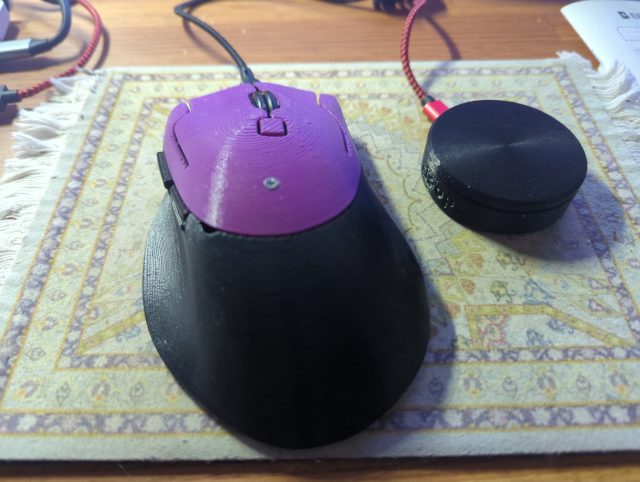
the mouse problem
I still haven’t solved my longstanding mouse problem. In a nutshell, while the trackpad on my Framework laptop (Laptop 13 (AMD Ryzen 7040Series)) running Fedora Linux 43 is as good as any I have found on a non-Apple laptop, it still isn’t good enough. There’s enough stall-and-jump stuff that makes it difficult to use. Not so much that I want to bring a mouse along when I travel, but at my desk I definitely prefer an actual mouse.
Except for scrolling.
With a trackpad (or with a mouse on my macOS machine), scrolling is smooth and fine-grained. I can scroll to what is effectively pixel-level accuracy. With the mouse, when I use the scroll wheel the window will scroll through several lines at a time. “Use Solaar!!” scream commenters. Nope, Solaar just means I have to move the wheel more or less before it the window (smoothly!) jumps several lines. “Turn on smooth scrolling in Firefox!!” say others. Nope, that just changes whether the several-line jump happens instantly or smoothly. It doesn’t make scrolling itself any smoother.
I’m baffled that this isn’t more of an issue. Obviously, it’s technically possible and apparently desirable as the trackpad does this out-of-the-box.
I even stopped using my somewhat expensive Logitech mouse in favor of an almost-free Syx mouse as it actually worked a bit better but still, no smooth scrolling (just smooth jumping).
Ploopy mouse
In desperation, I thought I’d try a Ploopy mouse. I had no reason to think it would do anything different out-of-the-box, though I held out hope that it might. What made me optimistic, though, is that the mouse is open-source. As in, the plastic parts are 3D printed and the source files and logic board designs are available, and the firmware is open-source QMK. If all else failed, I thought, I could just write my own firmware (or, more likely, modify QMK) so it could do what the trackpad does.
I got the mouse and… it’s great! Except the scrolling still jumps (but, but, but “smoothly”). Problem not solved. So I dove into QMK, and what I found was a bit disappointing. People said that it’s absolutely possible to emulate the trackpad scrolling, but that it doesn’t work so well. Apparently the resolution of the scroll wheel isn’t high enough. (Never mind that Apple seems to be able to do it even with the same cheap third-party mouse I was using.)
Ploopy knob
I did encounter references to Ploopy Knob, “a Knob you can twist as much as you like.” “It’s a really sensitive Knob.” (Yes, this is sexual innuendo.) “You’ll get smooth, pixel-by-pixel scrolling.” I thought I’d give it a try.
It does the scrolling I want, and does it extremely well, but it doesn’t do anything else. It has no buttons. It doesn’t move the pointer. It just scrolls, and that is all it does.
So I’m quite happy to have it and I use it a lot. But I’m still frustrated. What I really want is the Ploopy mouse, but with the scroll wheel replaced by a Ploopy knob. It makes it kind of expensive to have to buy both the mouse and the Knob. The Knob takes up extra desk space. I have to move my pointing hand around more. And now there is yet another cable cluttering up my desk.
Why is this so hard?
—2p